Links in Bucket: the chrome-extension that I wrote without writing any code

Newsletters have been a great source for my growth as an engineer. I’m subscribed in quite a few and I’ve even contributed to some. Unfortunately, I no longer have the time to sit down and read all the articles that piqued my interest. I’m always on the move for work or family matters or I will be doing chores at the house.

Making a podcast from the articles

Podcasts are the other source of learning things and keeping up with the latest trends. The fact that I can listen to them on idle time (commuting, chores) is why I keep on using them constantly.

A great feature that NotebookLM has is the creation of an audio file based on the resources you’ve provided. The fun part is that the audio is not a dry read through the gist of the resources. It is a rich dialogue between two characters much like a conversation in a regular podcast.

So one day I thought of combining the two and create a podcast from all the articles that I want to read but don’t have the time to. The result was good. Especially if I didn’t mix and match articles from different newsletters. What I didn’t like was the process. Each article had to be opened in its own tab since most newsletters don’t provide the direct link, then I had to copy the link, go to the notebook’s tab, paste it and repeat the steps for the next one.

What I wanted was to be able to right click on the newsletter’s link, save it to a list and when I’m done collecting links go to notebooklm and create a notebook from them.

Links in Bucket

I knew that this can be done through a chrome extension but I’ve never written one. Actually I’ve never written anything web related. In the past that would be the end of story. Nowadays, a couple of prompts and half an hour are all you need!

So, this is the initial prompt. It contains a quick summary of my need, a description of how I have imagine it work and the way it will used. Since I haven’t worked in this space before, I also asked the LLM to justify its decisions so that I will also learn a thing or two!

I am subscribed in various programming-related newsletter but I don’t have the time to read them all anymore. What I do have is a lot of commute time and a preferance into listening to podcasts.

So the use case is:
i want to manually open a newsletter, pick the articles that i want to read and for them save their link in a “bucket”. When ready I want to be able to dump that “bucket” of links in notebookllm and ask it to create a podcast for me.

In more details:
we need to create an extension for chrome-based browsers that provides two things:
(1) when the user does a right click on a link the extension provides a “save to bucket” option that saves the link in a local storage. some times the link might not lead directly to the article because of attribution systems etc. the extension must save the final link that opens the article.
(2) when the user does a right click on a text field it provides a “dump from bucket” option that fills the text field with the saved links, separated by a newline, and empties the bucket.

The extension is not intended to be upload to any store, i will be installing it from the file system.

Critical note: i am a seassoned software engineer but i’ve never build anything with javascript/typescript/bun. If possible use these technologies and provide detailed explanations of all the decisions in order to get familiarized with them.

After using the first outcome I quickly realized that I need to be able to remove links before dumping them:

we need to provide to the user the ability to remove links from her bucket. perhaps a list with all links and a small x or trash bin next to the link. if the number of the links is greater or equal to two then we need to provide a way to remove all them

If you want to take a look at the result you can find it here: https://github.com/le0nidas/links-in-bucket.
I’ve also included the plans that were created by the two prompts since they include the explanations that I’ve mentioned.

Leveraging @RequireOptIn to create composables that can be used only in previews

Anyone working with Kotlin, especially in the android world, has dealt with RequireOptIn. Actually they had to deal with the consequence of its application which is to explicitly opt-in into using a piece of code that is annotated with it.

@RequiresOptIn

In a nutshell, if you want the consumer of your code to be fully aware that they are about to use it, you annotate the code with RequiresOptIn and that forces the consumer to annotate the call site with OptIn.
Its like informing someone about the dangers of something and then having them sign that you have no responsibilities for anything that might happen to them.

@PreviewOnly

The problem

We have a composable, named renderList, that is part of module A and is being exposed to the rest of the project through another composable, named renderScreen:

// <module A>
// file RenderScreen.kt
@Composable
fun renderScreen(screen: Screen) {
renderTitle(screen.title)
renderList(screen.list)
}
// file RenderTitle.kt
@Composable
internal fun renderTitle(title: Title) {
// rendering the title
}
// file RenderList
@Composable
internal fun renderList(list: List) {
// rendering the list
}
// </module>

renderList knows how to render List instances and we want to preview this rendering but in another module.
Using renderScreen is not possible because it also contains components that cannot be initialized when being in design time.

The solution

We are going to add one more composable in module A which will expose only the renderList:

// <module A>
// file RenderScreen.kt
@PreviewOnly
@Composable
fun renderScreenPreviewer(list: List) {
renderList(screen.list)
}
// </module>

and to prevent its usage in production code we are going to add some friction with the @PreviewOnly annotation which underneath leverages @RequireOptIn:

@RequiresOptIn(
message = "This composable is intended for preview usage only",
level = RequiresOptIn.Level.ERROR
)
@Retention(AnnotationRetention.BINARY)
@Target(AnnotationTarget.FUNCTION)
annotation class PreviewOnly
view raw preview-only.kt hosted with ❤ by GitHub

This way every call site of renderScreenPreviewer will end up in a compilation error unless the user explicitly opts in into its usage:

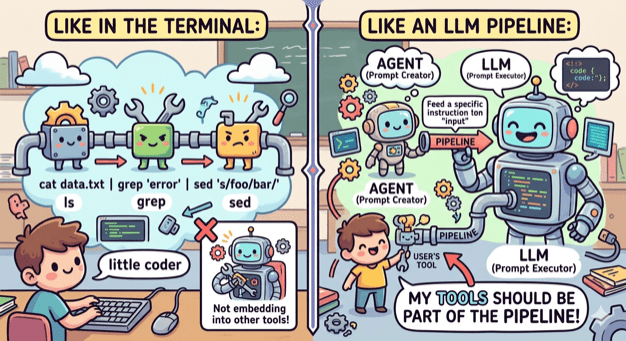
Use AI _in_ a tool not _as_ a tool

Or to be more exact, use a coding agent in a tool. This is my new starting point every time I begin to think of a tool I want to implement.

Being part of the pipeline

A couple of weeks ago I thought of creating an OpenCode agent that will check my uncommitted changes, construct a commit message and finally make the actual commit.

The first version was ok but I wanted to make a few changes. First I wanted the agent to follow certain guidelines, so I edited the agent file. Then I wanted to change the way it constructed the git command, so I edited the agent file. Finally I wanted to support the usage of GitButler, so I edited the agent file.

At that point I realized that I was violating the single responsibility principle big time. No matter the change I’ve kept editing the same component. And it hit me, fascinated by all the things I was able to do with a coding agent I failed to apply good engineering practices when it comes to the construction of tools.

Small coherent components that do one thing and do it well

When we write code we tend to break it into small modules, classes, functions that have one responsibility and provide a lean API. This way we can reuse components, combine them in different ways and replace them easily.

No need to do the opposite when it comes to tooling. The terminal has led the way by having small tools that do one thing (ls, grep, cat etc) and can be combined, by using pipes, into an entire workflow. My tools need to embrace that as well.

ai-commit.sh

So I broke my agent’s workflow into distinct components:

  1. Create a single prompt from collecting all changes. This can be done by a bash script.
  2. Feed the prompt to an agent that is configured to create a title and a message. This can be done by OpenCode with a custom agent.
  3. Get the agent’s output and use it to make a commit using the appropriate tool. This can be done by a bash script.

I created the two scripts and also wrote one more that ties everything together: ai-commit.sh

In case you are wondering why Hemingway (or Hemi for the friends) is in the picture, it’s just the name I gave to what was left from the original agent: hemi.md

Pinky and Brain v2

Three months I wrote about Pinky and Brain, my agent/subagent duo that was helping me plan and execute a task while being in the loop. I was using it quite often but whenever I did I also saw the number of my available copilot requests decreasing fast! So I started avoiding it and preferred writing code manually like a caveman.

My setup was a testimony of using coding agent as a tool. It was doing everything. Apart from planning, that should be done by it, it was also looping through tasks, delegating work, making commits, asking for the user’s approval to continue looping. Many of these operations where new requests (x3 because of Opus).

So I sat down and broke that too:

  1. Planning is still being make by an agent (Brain). Only this time it is not tied to a model and it is very restricted. It can only save the created tasks to beads which will be loaded as a skill.
  2. Execution is still being done by an agent (Pinky). Only this time it is even more simpler. It is asked to just follow instructions nothing else.
  3. Everything else is part of a bash script that (a) uses bd to get the next task, (b) provides its description as a prompt to Pinky, (c) closes the task when Pinky returns, (d) uses ai-commit.sh to create a commit, (e) loop again.

I’ve been using it for a couple of weeks now and I’m sure I have a better consumption of requests.