I started playing with the memento pattern for a use case I was researching when I realized that the Kotlin implementation had a, potentially, show stopper in comparison with the Java one:
I could not use a private property from within the same file
Why was that a show stopper? We’ll see, but first, what is the memento pattern?
Memento pattern
This pattern is a good way to implement a functionality that helps in restoring previous states. One good example is the undo in our text editors. You can write, edit, delete and then, by hitting undo, take each action back.
There are three main ingredients for this pattern:
the originator that holds the current state and creates snapshots of itself,
the memento that, in essence, is the snapshot with perhaps some additional metadata and
the caretaker that orchestrates the backup/restore of the state
So in our example the originator is the editor which knows what the text is, the carets position etc, the memento a copy of those values and the caretaker can be the interface between the user and the editor.
Java implementation
Lets try to have an overly simplified version of the above example in Java:
This file contains hidden or bidirectional Unicode text that may be interpreted or compiled differently than what appears below. To review, open the file in an editor that reveals hidden Unicode characters.
Learn more about bidirectional Unicode characters
Here the editor, besides manipulating text, is able to produce snapshots of its state in a way that only itself can access the state’s values. The Memento class might be public, in order to allow the caretaker to handle instances of it, but its fields are private and only the originator can read them. A great way to copy something while having the smallest possible API surface and maximum privacy.
As a matter of fact, here is the caretaker and its usage:
This file contains hidden or bidirectional Unicode text that may be interpreted or compiled differently than what appears below. To review, open the file in an editor that reveals hidden Unicode characters.
Learn more about bidirectional Unicode characters
As you can see the UI uses the editor to write, edit, delete but before that it saves a backup with the editor’s state in order to restore it every time the user hits undo!
Kotlin implementation
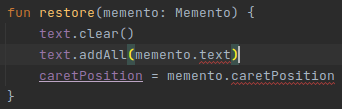
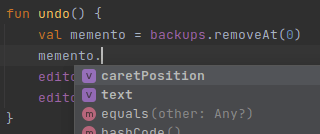
So lets move originator and memento to Kotlin. Ctrl+Alt+Shift+K and boom.. we have a problem:
Kotlin, in contrast with Java, does not allow accessing private properties when in the same file.
What do we do? Well we can always make the properties public:
This file contains hidden or bidirectional Unicode text that may be interpreted or compiled differently than what appears below. To review, open the file in an editor that reveals hidden Unicode characters.
Learn more about bidirectional Unicode characters
but this way we, indirectly, expose the editors state:
Another way to implement the pattern is to have Memento as an interface with no state for the public API and have a private implementation of it for internal usage:
This file contains hidden or bidirectional Unicode text that may be interpreted or compiled differently than what appears below. To review, open the file in an editor that reveals hidden Unicode characters.
Learn more about bidirectional Unicode characters
this way we do not expose any state but we do open a bit our API. We now have an interface that can be implemented and given to the restore() function.
Inner classes
Fortunately Kotlin has inner classes. An inner class can access the outer class’s members but, most importantly, can be extended only from within the outer class. This means that this:
This file contains hidden or bidirectional Unicode text that may be interpreted or compiled differently than what appears below. To review, open the file in an editor that reveals hidden Unicode characters.
Learn more about bidirectional Unicode characters
I want to be as explicit as possible and allow the reader of my code to have an uninterrupted flow.
Think about it. Every time you encounter the it keyword you do, a quick, conversion between what you see and what it represents. Personally I do it even in very small lambdas, imagine if you are two or three lines deep in a lambda and you see an it:
This file contains hidden or bidirectional Unicode text that may be interpreted or compiled differently than what appears below. To review, open the file in an editor that reveals hidden Unicode characters.
Learn more about bidirectional Unicode characters
It might not look much in this simple example but read it now with an explicit value:
This file contains hidden or bidirectional Unicode text that may be interpreted or compiled differently than what appears below. To review, open the file in an editor that reveals hidden Unicode characters.
Learn more about bidirectional Unicode characters
You don’t have to do a mental translation and it also provides some details regarding the format of username.
This last part can make the code even more readable since it allows us to describe the values we use:
This file contains hidden or bidirectional Unicode text that may be interpreted or compiled differently than what appears below. To review, open the file in an editor that reveals hidden Unicode characters.
Learn more about bidirectional Unicode characters
Kotlin’s compiler is clever enough to figure out on its own what is the return type of a function but this does not mean that we should over use it and here is why:
Help the compiler to help us
By adding a return type in a function we instruct the compiler to expect and force that type (by a compiler error). On the other hand if we allow the compiler to infer the type, if something changes in the function’s body and the return type is not the one intended by the author, the compiler will follow along thinking that we know what we are doing!
Help the reader [to help us]
We write something once but it gets read multiple times. So it is our responsibility to make it as readable, explicit and quick in the eye as we can. In every case that we omit a return type the reader of our code has to do the calculations and extract the type on her own which, depending on the complexity, will take time and effort. You might say that a few seconds is not a big deal but in comparison with the zero seconds of having a type it is a lot.
Also not all reading takes place in an IDE that provides hints and colorful help. Our PR reviewers will probably read out code directly from GitHub or GitLab. By making them change context to figure something out we break their flow and concentration.
So, when should we use it
Never! In my humble opinion the only valid place is in small (one line), private methods that either construct something, so the use of the constructor along side the = sign trick the mind:
This file contains hidden or bidirectional Unicode text that may be interpreted or compiled differently than what appears below. To review, open the file in an editor that reveals hidden Unicode characters.
Learn more about bidirectional Unicode characters
This file contains hidden or bidirectional Unicode text that may be interpreted or compiled differently than what appears below. To review, open the file in an editor that reveals hidden Unicode characters.
Learn more about bidirectional Unicode characters
Lets say we have a simple application that executes certain actions dictated by an external service.
More particular the external service sends a response that looks like this:
This file contains hidden or bidirectional Unicode text that may be interpreted or compiled differently than what appears below. To review, open the file in an editor that reveals hidden Unicode characters.
Learn more about bidirectional Unicode characters
This file contains hidden or bidirectional Unicode text that may be interpreted or compiled differently than what appears below. To review, open the file in an editor that reveals hidden Unicode characters.
Learn more about bidirectional Unicode characters
and there is an executor to help as translate the response to an actual action execution:
This file contains hidden or bidirectional Unicode text that may be interpreted or compiled differently than what appears below. To review, open the file in an editor that reveals hidden Unicode characters.
Learn more about bidirectional Unicode characters
This is an implementation of the Strategy Pattern where every strategy is a certain action allowing us to add as many actions as we want as long as there is a one-to-one relation with what the response sends:
This file contains hidden or bidirectional Unicode text that may be interpreted or compiled differently than what appears below. To review, open the file in an editor that reveals hidden Unicode characters.
Learn more about bidirectional Unicode characters
One day the external service decides to add a print error action but it does not do it by having a new action value. Instead it decides to have an is error flag which must be taken under consideration when the action value is print!
So the response is now this:
This file contains hidden or bidirectional Unicode text that may be interpreted or compiled differently than what appears below. To review, open the file in an editor that reveals hidden Unicode characters.
Learn more about bidirectional Unicode characters
leading us into having an if in the print action’s code
This file contains hidden or bidirectional Unicode text that may be interpreted or compiled differently than what appears below. To review, open the file in an editor that reveals hidden Unicode characters.
Learn more about bidirectional Unicode characters
which defeats the purpose of the strategy pattern and violates the SRP. Each strategy should do one thing and one thing only. By having an if in the strategy we allow it to implement two actions thus having two reasons to change.
Adding a chain
What we need is a way to allow the representation of a single action value from multiple strategies where each one implements a unique action depending on the values of the response.
This is where the Chain of Responsibility Pattern comes in helping as into having multiple actions tied together, passing the response to each other until one of them can execute it.
There are two ways to implement the pattern depending on the size and state of your project.
Using inheritance
If you have a small project with just a few actions and you don’t mind touching many files you can use inheritance and have each action containing the next in the chain:
This file contains hidden or bidirectional Unicode text that may be interpreted or compiled differently than what appears below. To review, open the file in an editor that reveals hidden Unicode characters.
Learn more about bidirectional Unicode characters
This file contains hidden or bidirectional Unicode text that may be interpreted or compiled differently than what appears below. To review, open the file in an editor that reveals hidden Unicode characters.
Learn more about bidirectional Unicode characters
If we do not wish to change any of the existing actions then composition is the only way.
What we need is a way to wrap an existing action in an object that will (a) hold the next action in the chain and (b) decide which action will be executed, the wrapped or the next one:
This file contains hidden or bidirectional Unicode text that may be interpreted or compiled differently than what appears below. To review, open the file in an editor that reveals hidden Unicode characters.
Learn more about bidirectional Unicode characters
This file contains hidden or bidirectional Unicode text that may be interpreted or compiled differently than what appears below. To review, open the file in an editor that reveals hidden Unicode characters.
Learn more about bidirectional Unicode characters
I decided to take a look at GitHub Actions so for the past week I’ve been watching and reading everything about it. I even wrote a post, an Introduction to GitHub Actions. What I found really interesting is the fact that you can write an action using the language you feel more comfortable with. And so I did!
There are three ways to create an action but only the one using Docker allows us to use the language we want.
In all three ways the main two ingredients are:
the action’s code
the action’s metadata, a file called action.yml which is placed in the root folder of your project and defines how the action will run and what inputs/outputs it has.
In our case there is also a third ingredient, a Dockerfile or a docker image which is used by the action’s runner to create a container and execute the action’s code inside it. All you have to do is to make sure that the action’s executable parts are being copied in the container and that are called upon its start.
The runner makes sure that the working space is being mounted to the container (in the state that it was just before the action is started) along with all the environment variables and the inputs the action needs. You can read more in the documentation.
Ktlint PR comments
Action’s code
The action has three distinct parts.
The first part is responsible for using GitHub’s REST API to collect all of the PR’s changes and then keep those that are in Kotlin files and were added or modified. For that I used kscript and I was able to leverage all the libraries that I was accustomed to, like Retrofit and Moshi. When I was happy with the resulted script I used its --package option to create a standalone binary and copy it in the action’s Docker image.
The second part is a combination of bash commands that execute the ktlint binary by passing to it the results of the first part. Ktlint is being called with the --reporter=json parameter in order to create a JSON report.
The third and final part is again a kscript script that uses the report created before and GitHub’s REST API to make a PR line comment for every ktlint error that is part of the PR’s diff. Again a standalone binary was created and put in the image.
Note:
I like kscript since I can write things fast, easy and with all the libraries that I know but I also like writing test first and that proved to be quite difficult. So what I ended up doing was to act as if I was in a Kotlin project. I created my tests (using all my favorites like junit5, hamkrest and MockWebServer) and from that I created .kt files with the proper functionality. And for having a script I created a .kts file where I defined the external dependencies and included the .kt files:
This file contains hidden or bidirectional Unicode text that may be interpreted or compiled differently than what appears below. To review, open the file in an editor that reveals hidden Unicode characters.
Learn more about bidirectional Unicode characters
From the start what I wanted for this action was to be as autonomous as possible leaving very little responsibilities to the consumer and allowing her to just plug it in and watch it play.
For that the only input the action needs is a token, for allowing the kscript scripts to communicate with the API, which will most likely be the default secrets.GITHUB_TOKEN making the action’s usage as simple as adding the following lines in your workflow:
A lot of things must happen in order to have the action ready to run. Sdkman, Kotlin and kscript must be installed, the code needs to be retrieved from the repository and both kscript scripts have to be packaged. On top of that ktlint must be downloaded and placed in the proper path.
For all that, and to shave a few seconds from the action, I decided to have an image that has everything ready. So I created a workflow that gets triggered every time there is a push in the main branch, builds and packs everything in an image and pushes the result to Docker Hub.
So now the action simply uses that image to run a container without any other ceremonies.
Note:
Before using Docker Hub I tried to use GitHub Packages but it turns out that public is not that public* since it requires an authentication to retrieve a package.
Summary
That’s it! An action for having ktlint’s report as comments in your PR. A result of trial and error since I wrote it while learning about actions but I hope that someone might find it useful. If you do let me know!
I’ve used scratch files in IntelliJ IDEA and Android Studio but I think that can be found in all of Jetbrain’s products.
What are they?
Scratch files are files that don’t get tracked by the version control system, can be created at any given time and, most importantly, get bind to the IDE and not the project that is currently open.
How do I create them?
The simplest way is to hit ctrl+alt+shift+insert. If you can’t remember it press shift twice and start writing scratch, you will be presented with the action of creating a new one.
The next step is to choose what kind of file you want to create and this is where it gets interesting since you can choose from a plethora of file types. From plain text, to markdown, Kotlin, JSON, XML, ruby and many many more!
How do I use them?
By choosing the file’s type you choose how the IDE will behave when you are working on it, so if you create a scratch.json and paste some json in it you can format it accordingly. Or if you create a scratch.md you can start writing in markdown and have a preview of your work.
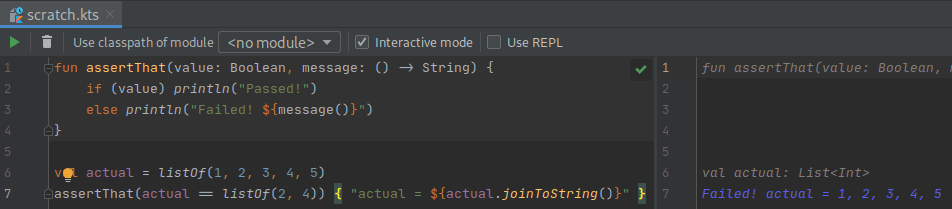
But the most powerful aspect of those files is when you create code related ones. If, for example, you create a scratch.kts file and start writing some Kotlin in it, you will see your code being run on the fly presenting to you its result:
TDDish
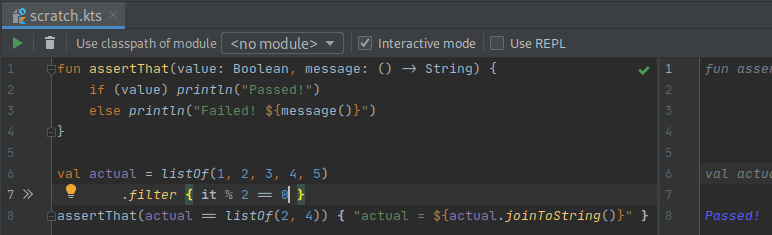
You can even work test first if you need to figure out a quick algorithm and have your test run in every change you make!
I usually start with an assertThat function and a failing test and go from there:
Today I came across a piece of code that looked like this:
fun printAll(vararg names: String?) {
  names.forEach { name -> println(name) }
}
and noticed that the IDE did not complain about using names without checking if it is null names?.forEach { ... }!
After decompiling Kotlin’s bytecode I saw that no matter what type I use (String? or String) the java code was the same:
public static final void printAll(@NotNull String... languages) {
  //...
}
Does the Kotlin compiler ignore the nullable type completely? Turns out that yes!
And the reason is quite clear and straightforward but it hadn’t registered in my mind until now:
Note that vararg parameters are, as a rule, never nullable, because in Java there is no good way to distinguish between passing null as the entire vararg array versus passing null as a single element of a non-null vararg array.
This is one of those cases that you go down the rabbit hole and end up doing ten different things before the one that you initially wanted to!
My original intention was to try out kscript. What I ended up doing is learning about dockerfiles, building images and trying to run .kts files without having kscript, or kotlin, installed locally in my machine!
The result
A github repository that you can clone, run the install script and have a kscript executable that works as described here.
Why?
I wanted to play with kscript but did not want to install it on my machine. I don’t like bloating my OS by having libraries and software that might not be used often.
How?
Having everything installed in a docker image and use containers to play with kscript was a one way street for what I wanted to achieve.
Dockerfile
It was my first dockerfile but there are tons of tutorials that helped me out. I ended up using alpine, installing java through its repositories, sdkman using its installation guide and kotlin, kscript through sdkman!
Finally, kscript was added as the image’s entry point which means that every time a container is being run kscript will be the first command that gets executed.
And it worked for the most parts. By executing
docker run –rm -i kscript <params>
rm to remove the container after its done, -i to have the script’s output passed to the terminal
I was able to use kscript as described in its repository, except for the case of having a .kts file!
kscript-router.sh
For the case of a .kts file what turned out to solve my problem was to pass the file’s entire content. And this is part of what kscript-router.sh does. It checks if the first parameter is a .kts file and if so it passes its contents to the container. In every other case it passes all given parameters directly to the container.
install.sh
To tie everything together I added a script that creates the image, adds the router script to the user’s path and creates an alias, named kscript, for executing the router.
A quick way to make a codebase more readable is to extract long or complex conditions / predicates to their own functions. The function’s name will explain to the reader what is being checked allowing her to move forward instead of trying to figure out the context or the calculations that are taking place.
The task
This file contains hidden or bidirectional Unicode text that may be interpreted or compiled differently than what appears below. To review, open the file in an editor that reveals hidden Unicode characters.
Learn more about bidirectional Unicode characters
Lets assume that we have a piece of code that prints all tasks that were created in the last two days and are, as the business experts calls them, completed. Which means that are either Resolved or Cancelled.
This file contains hidden or bidirectional Unicode text that may be interpreted or compiled differently than what appears below. To review, open the file in an editor that reveals hidden Unicode characters.
Learn more about bidirectional Unicode characters
We have two distinct concepts that can be extracted. One that will explain the date calculations and one that will force the business knowledge behind those two statuses.
createdInTheLastTwoDays()
The calculations can be extracted to a private function but since we are using Kotlin we will extract them to an extension function to make the code even more readable:
This file contains hidden or bidirectional Unicode text that may be interpreted or compiled differently than what appears below. To review, open the file in an editor that reveals hidden Unicode characters.
Learn more about bidirectional Unicode characters
Another benefit of having “the mentality of extraction” (yep, I just made it up) is that eventually we will come across a case like the completed which is a business term that has not been transferred to the codebase!
So we don’t just make the code more readable but we improve our domain representation and force a rule that until now was known through documentations or, even worse, through conversations only.
This file contains hidden or bidirectional Unicode text that may be interpreted or compiled differently than what appears below. To review, open the file in an editor that reveals hidden Unicode characters.
Learn more about bidirectional Unicode characters
In a recent code review one of my colleagues was concerned that part of the code I wrote might cause us problems because of the null object pattern I chose to use.
The code was something like this:
This file contains hidden or bidirectional Unicode text that may be interpreted or compiled differently than what appears below. To review, open the file in an editor that reveals hidden Unicode characters.
Learn more about bidirectional Unicode characters
and my colleague was referring to the Nobody usage.
That got me thinking. Can this usage of sealed classes be considered as an implementation of the null object pattern? Also, why is the usage of this design pattern a bad thing?
So, what is this pattern? This pattern is one way to solve the
we don’t want a method to return a null value and force ourselves to check it before usage
my definition 😛
Ok, it might be better to have an example:
Lets say that we have a service that returns the workout we did in a particular date. Each workout has the duration of the exercise and if we did not workout on the given date the service returns null (we’ll pretend for a moment that Kotlin does not have null safety or those great extensions like map, sum etc):
This file contains hidden or bidirectional Unicode text that may be interpreted or compiled differently than what appears below. To review, open the file in an editor that reveals hidden Unicode characters.
Learn more about bidirectional Unicode characters
By introducing a null object, for those days that we did not workout, we can remove the null checks and have a more readable code:
This file contains hidden or bidirectional Unicode text that may be interpreted or compiled differently than what appears below. To review, open the file in an editor that reveals hidden Unicode characters.
Learn more about bidirectional Unicode characters
From the example we could easily conclude that this pattern is quite helpful. Right?
Well, as everything in our industry: it depends! When we need a way to have some default values so that our calculations won’t crash and burn then it is a good choice. But if we use it in ways that we hide things we might end up in false successes.
For example, lets assume that we have a storage interface and a factory function that returns the proper storage implementation depending on a given value:
This file contains hidden or bidirectional Unicode text that may be interpreted or compiled differently than what appears below. To review, open the file in an editor that reveals hidden Unicode characters.
Learn more about bidirectional Unicode characters
If something is not configured well we might end up using, through out our entire project, the NullStoragethinking that we have saved everything when in reality we lost our data!
In case you missed it there is a space in the cloud-type so no matter how many times we ask for the “cloud”-storage we will get the null-storage back. Silly example with a silly mistake but imagine what could go wrong in real projects!
So, back to the code that started all this
First thing is first:
Q: Is this usage of sealed classes an implementation of the null object pattern?
A: No. The Nobody object is just a representation of a valid state for the AssignedTo concept and does not provide any default values or hides any method usage.
Q:Can sealed classes be used for implementing the null object pattern?
A: Yes. Sealed classes can help us in having many values for one concept but the fact that we can use full fledged classes, that can also inherit a bunch of things, is quite powerful and can be easily misused. I don’t see anything stopping us from implementing the storage-example using sealed classes so we just need to think things carefully.
And now the twist:
As is, the code does not implement the design pattern but with a small change we can make it not only to implement it but to do it badly too! We’ll just move the name property to the parent and have Nobody provide an empty value:
This file contains hidden or bidirectional Unicode text that may be interpreted or compiled differently than what appears below. To review, open the file in an editor that reveals hidden Unicode characters.
Learn more about bidirectional Unicode characters
Q:Why is this bad? It does not hide anything, it provides a default value and to be honest we just need to pass “nobody”, instead of an empty string, to the super constructor.
A: Well, this time it depends on where we use the pattern and not how. If this code is part of our core layer then we are allowing this layer to decide on presentation issues! It should be the presentation layer that will check what value the assignedTo has and print “nobody”!
Our previous implementation of AssignedTo was forcing us to make the distinction between all of its values so we did not have much of a choice but to let the print function decide.
In conclusion
Think twice before using the null object pattern and, if you are in a team, try to put code reviews as part of your work flow. It is always good to have a fresh pair of eyes look at your code and even better to have a few people to discuss (and argue) about your choices.
Trying to explain something will make you understand it better!


 le0nidas