When reviewing a PR I try to elaborate on my proposals for two reasons:
1. Out of respect to my colleague
Every piece of code is part of an effort that took time and thought. Requesting a code change by simply asking it (i don't like it, change it) or by dictating it (do it this way) demotes all the work that has been done.
I figured that, since my colleague spent a few hours to come up with a solution I owe her/him more than a few seconds!
2. I solidify my knowledge or even better, learn something new
By trying to justify the reason behind a request I end up understanding better why I prefer a solution or a format over another.
When I provide an example or when I do a mini investigation to help me clarify why something must change I often find that (a) many things that I thought I knew were not as I had them in mind and (b) I now understand a concept much better because I had to write about it. You don’t master something if you can’t explain it!
PS: never forget that it might say “request a change” but in reality you start a conversation between two professionals that will eventually benefit of the project
I recently had to revert an entire feature and create a new branch that would be merged in the future. In git terms, I had to revert my merged branch, create a new one and cherry pick the reverted commits to it.
I’ve been working with git for years but up until now I never had to revert a commit, let alone an entire branch. Turns out reverting is quite simple and can be done in a single command but cherry-picking all the branch’s commits is a repeatable and tedious task since we need to copy each commit, create a string out of them and give it to cherry-pick.
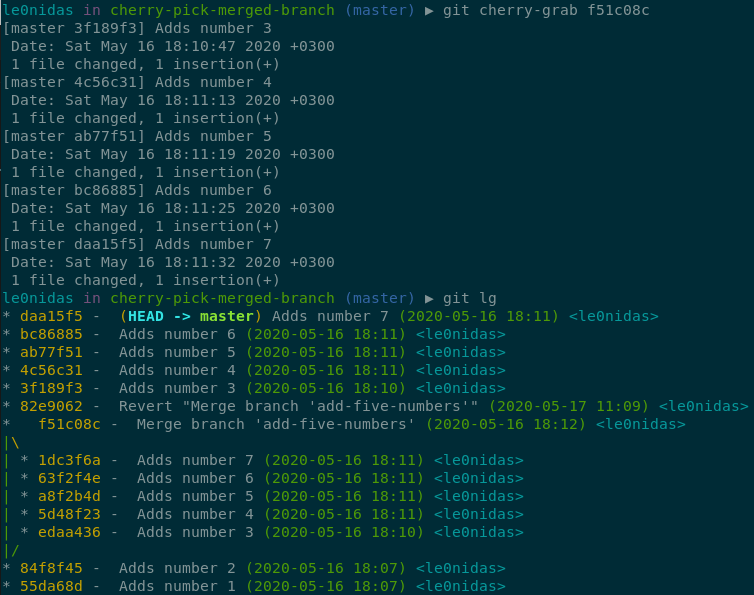
What I wanted was a way to give git the merge commit and let it figure out which commits to cherry-pick. For example, in the case described below:
I would like to cherry-pick all five commits edaa436, 5d48f23, a8f2b4d, 63f2f4e, 1dc3f6a by just providing to git the commit f51c08c.
Two things helped in creating cherry-grab and the first one is the ^ suffix that one of its usages is to get the commit’s parent. So if we run git show edaa436^ git will translate it to git show 84f8f45.
In our case where the commit is the result of a merge we can specify which of the two parents we want. f51c08c^1 will be translated to 84f8f45 and f51c08c^2 to 1dc3f6a (in a similar way if we need the nth parent we request it by using ^n).
git rev-list <commit>
The second thing was rev-listwhich returns a list with all the commits that can be reached through the parent “pointer” starting from the provided commit. So if we run git rev-list edaa436 git will return edaa436, 84f8f45 and 55da68d.
Also, rev-list can exclude all commits that are reachable from a given commit as long as we prefix it with the caret (^) symbol. So if we run git rev-list edaa436 ^84f8f45 git will return just edaa436.
cherry-grab
First we need to get the list with all of the branch’s commits. To do that we will use the rev-list command and request all commits starting from the merge-commit’s second parent but exclude all commits that are reachable from the merge-commit’s first parent:
git rev-list 1dc3f6a ^84f8f45
this returns 1dc3f6a, 63f2f4e, a8f2b4d, 5d48f23, edaa436 which are the commits that construct the merged branch.
Then we need to reverse this list so that we can apply each commit in the proper order:
git rev-list 1dc3f6a ^84f8f45 | tac
which returns edaa436, 5d48f23, a8f2b4d, 63f2f4e, 1dc3f6a.
Having the commits in the correct order we just need to pass them to the cherry-pick command to apply their changes:
Finally we need to put in an alias to make it reusable:
This file contains hidden or bidirectional Unicode text that may be interpreted or compiled differently than what appears below. To review, open the file in an editor that reveals hidden Unicode characters.
Learn more about bidirectional Unicode characters
Nothing fancy or special, we just wrap the sequence of command with a function and tell git to call that function when ever we use the cherry-grab alias.
In order to make it reusable we replace the parent commits with $1^2 and $1^1 respectively which are translated to the second and first parent of the passed commit.
In a recent code review one of my colleagues was concerned that part of the code I wrote might cause us problems because of the null object pattern I chose to use.
The code was something like this:
This file contains hidden or bidirectional Unicode text that may be interpreted or compiled differently than what appears below. To review, open the file in an editor that reveals hidden Unicode characters.
Learn more about bidirectional Unicode characters
and my colleague was referring to the Nobody usage.
That got me thinking. Can this usage of sealed classes be considered as an implementation of the null object pattern? Also, why is the usage of this design pattern a bad thing?
So, what is this pattern? This pattern is one way to solve the
we don’t want a method to return a null value and force ourselves to check it before usage
my definition 😛
Ok, it might be better to have an example:
Lets say that we have a service that returns the workout we did in a particular date. Each workout has the duration of the exercise and if we did not workout on the given date the service returns null (we’ll pretend for a moment that Kotlin does not have null safety or those great extensions like map, sum etc):
This file contains hidden or bidirectional Unicode text that may be interpreted or compiled differently than what appears below. To review, open the file in an editor that reveals hidden Unicode characters.
Learn more about bidirectional Unicode characters
By introducing a null object, for those days that we did not workout, we can remove the null checks and have a more readable code:
This file contains hidden or bidirectional Unicode text that may be interpreted or compiled differently than what appears below. To review, open the file in an editor that reveals hidden Unicode characters.
Learn more about bidirectional Unicode characters
From the example we could easily conclude that this pattern is quite helpful. Right?
Well, as everything in our industry: it depends! When we need a way to have some default values so that our calculations won’t crash and burn then it is a good choice. But if we use it in ways that we hide things we might end up in false successes.
For example, lets assume that we have a storage interface and a factory function that returns the proper storage implementation depending on a given value:
This file contains hidden or bidirectional Unicode text that may be interpreted or compiled differently than what appears below. To review, open the file in an editor that reveals hidden Unicode characters.
Learn more about bidirectional Unicode characters
If something is not configured well we might end up using, through out our entire project, the NullStoragethinking that we have saved everything when in reality we lost our data!
In case you missed it there is a space in the cloud-type so no matter how many times we ask for the “cloud”-storage we will get the null-storage back. Silly example with a silly mistake but imagine what could go wrong in real projects!
So, back to the code that started all this
First thing is first:
Q: Is this usage of sealed classes an implementation of the null object pattern?
A: No. The Nobody object is just a representation of a valid state for the AssignedTo concept and does not provide any default values or hides any method usage.
Q:Can sealed classes be used for implementing the null object pattern?
A: Yes. Sealed classes can help us in having many values for one concept but the fact that we can use full fledged classes, that can also inherit a bunch of things, is quite powerful and can be easily misused. I don’t see anything stopping us from implementing the storage-example using sealed classes so we just need to think things carefully.
And now the twist:
As is, the code does not implement the design pattern but with a small change we can make it not only to implement it but to do it badly too! We’ll just move the name property to the parent and have Nobody provide an empty value:
This file contains hidden or bidirectional Unicode text that may be interpreted or compiled differently than what appears below. To review, open the file in an editor that reveals hidden Unicode characters.
Learn more about bidirectional Unicode characters
Q:Why is this bad? It does not hide anything, it provides a default value and to be honest we just need to pass “nobody”, instead of an empty string, to the super constructor.
A: Well, this time it depends on where we use the pattern and not how. If this code is part of our core layer then we are allowing this layer to decide on presentation issues! It should be the presentation layer that will check what value the assignedTo has and print “nobody”!
Our previous implementation of AssignedTo was forcing us to make the distinction between all of its values so we did not have much of a choice but to let the print function decide.
In conclusion
Think twice before using the null object pattern and, if you are in a team, try to put code reviews as part of your work flow. It is always good to have a fresh pair of eyes look at your code and even better to have a few people to discuss (and argue) about your choices.
Trying to explain something will make you understand it better!
In the company I work we use the gitflowworkflow and in every feature branch we make sure that part of its name is the task’s id which includes a unique number. So what we end up with is something like:
feature/T12345-make-the-app-rock
What I wanted was an easy way to checkout a branch using just the number. I wanted (spoiler: and succeeded) something like this:
git ch 12345
Terminal
Lets see how we can checkout a branch without an alias but by using the task’s number.
Get the branch
We can get the branch by listing all branches (git branch) and then grep for the one that contains the task’s number:
git branch | grep 12345
this will return feature/T12345-make-the-app-rock
Checkout to it
Having a way to get the branch makes the checkout quite easy since we can use bash’s command substitution to execute the above commands and use the result directly in the checkout:
git checkout $(git branch | grep 12345)
Put it in a function
We are now able to checkout the task’s branch but it would be nice if we could change the task’s number more easily. Lets create a function and pass the number as a parameter:
This file contains hidden or bidirectional Unicode text that may be interpreted or compiled differently than what appears below. To review, open the file in an editor that reveals hidden Unicode characters.
Learn more about bidirectional Unicode characters
The $1 is where the parameter will be used (if we had more parameters we would use $2 for the second, $3 for the third etc).
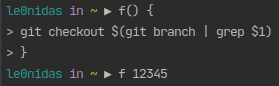
You can check the function by writing it directly in the terminal. Just make sure that you add newlines (press enter):
The alias
We can change branches easily but once we close the current terminal session we lose everything. Our goal is to have all that in a git alias.
Creating an alias can be achieved either by using git config
git config –global alias.ch checkout
or by doing it manually and adding the alias directly into the .gitconfig file (usually located in the home directory). The file should end up with something like:
This file contains hidden or bidirectional Unicode text that may be interpreted or compiled differently than what appears below. To review, open the file in an editor that reveals hidden Unicode characters.
Learn more about bidirectional Unicode characters
Having just the alias will not help us much. As is, it will work only if we give it the entire branch:
git ch feature/T12345-make-the-app-rock
What we need is a way to connect the function that we created with the alias.
The answer is provided by git itself since it has a way to create aliases that do not execute a git command but an external command:
However, maybe you want to run an external command, rather than a Git subcommand. In that case, you start the command with a ! character. This is useful if you write your own tools that work with a Git repository.
Following the docs we can change the gitconfig file to look like this (this time the change must be made only manually because our function will need to have newlines):
This file contains hidden or bidirectional Unicode text that may be interpreted or compiled differently than what appears below. To review, open the file in an editor that reveals hidden Unicode characters.
Learn more about bidirectional Unicode characters
Lets say we have a contacts app and one of the screens shows the contact’s phone number.
This file contains hidden or bidirectional Unicode text that may be interpreted or compiled differently than what appears below. To review, open the file in an editor that reveals hidden Unicode characters.
Learn more about bidirectional Unicode characters
The problem with that code is that we can easily end up with instances that contain invalid state:
A phone number screen with an empty phone number!
Approach #1:
One way to prevent it is to add some logic in the presentation layer:
Open the phone number screen only if the phone number is not empty
This file contains hidden or bidirectional Unicode text that may be interpreted or compiled differently than what appears below. To review, open the file in an editor that reveals hidden Unicode characters.
Learn more about bidirectional Unicode characters
Unfortunately this approach does not provide an actual solution but a patch. Our main goal is to have a PhoneNumberScreen that handles ONLY valid phone numbers.
Approach #2:
What we need is to move the necessary checks inside the PhoneNumberScreen class.
We could check the number’s validity on render and show some kind of message when there is no phone number.
This file contains hidden or bidirectional Unicode text that may be interpreted or compiled differently than what appears below. To review, open the file in an editor that reveals hidden Unicode characters.
Learn more about bidirectional Unicode characters
It is quite clear that this solution provides a bad UX. Why open a screen when the user cannot use it? Also, in any additional usage of phoneNumber inside the PhoneNumberScreen we need to make the same check as in render() and handle both of its states.
Approach #3:
What we really need is to make sure that if the screen is created, then it is certain that it has a valid phone number. There are two ways to achieve that. The first one is by checking upon creation that the phone number is valid and throw an exception if it is not.
This file contains hidden or bidirectional Unicode text that may be interpreted or compiled differently than what appears below. To review, open the file in an editor that reveals hidden Unicode characters.
Learn more about bidirectional Unicode characters
It works but we need to document it and add a try-catch wherever we create a screen instance.
The second one is by having a helper function that creates the screen only if the phone number is valid.
This file contains hidden or bidirectional Unicode text that may be interpreted or compiled differently than what appears below. To review, open the file in an editor that reveals hidden Unicode characters.
Learn more about bidirectional Unicode characters
This also works as expected but once again we need to document it and on top of that handle any null values returned by the helper function.
Nevertheless this solution seems fine and for a very small code base is quite acceptable. The problem is that it does not scale alongside the code base. Imagine how many helper functions we need to implement every time we have to use a phone number instance in our components if we want to keep them “clean”.
The actual problem
The actual problem lies in the PhoneNumber itself. It represents more than one states and each time we use an instance of it we must “dive” in its value and translate it to that state.
What we really need is a better representation of a valid and invalid phone number.
Final approach
This is where we use sealed classes and separate the two states:
This file contains hidden or bidirectional Unicode text that may be interpreted or compiled differently than what appears below. To review, open the file in an editor that reveals hidden Unicode characters.
Learn more about bidirectional Unicode characters
This way we accomplish our main goal: we change the PhoneNumberScreen to accept only instances of ValidPhoneNumber and can now be certain that the screen will be used only with valid data. The code is self documented and any further development in the screen class will not have to consider other states for the phone number:
This file contains hidden or bidirectional Unicode text that may be interpreted or compiled differently than what appears below. To review, open the file in an editor that reveals hidden Unicode characters.
Learn more about bidirectional Unicode characters
One big drawback of this change is that every usage of the PhoneNumber class has just broke (see: creation of Contact instances).
Fortunately there is a quick solution for that! Factory function:
A function that has the same name with the previously used class (PhoneNumber) and takes a single string parameter. If the parameter is not empty it returns a ValidPhoneNumber. In any other case it returns an InvalidPhoneNumber:
This file contains hidden or bidirectional Unicode text that may be interpreted or compiled differently than what appears below. To review, open the file in an editor that reveals hidden Unicode characters.
Learn more about bidirectional Unicode characters
The end result is almost the same as the starting point but this time we have clear states and components that can guarantee that they will not crash because of erroneous data:
This file contains hidden or bidirectional Unicode text that may be interpreted or compiled differently than what appears below. To review, open the file in an editor that reveals hidden Unicode characters.
Learn more about bidirectional Unicode characters
And a good way to know if it doesn’t is to read it where it gets used. If, after reading it, you have questions then something is wrong with the name.
A good example is this code that I run into:
if (handleClickItem(customer)) {
    return;
}
When I read this piece of code the very first thing that popped into my head was
How does the click gets handled?!
To figure that out I had to step into the function’s body and start reading it in order to understand what it does and when. It broke my flow and made me change context.
Turned out that this particular function, depending on the customer’s type, opens the contact’s screen and returns true or simply returns false. Having read something like:
if (openContactsScreenWhenCustomerIsCompany(customer)) {
    return;
}
would have been enough for me to simply keep reading and never look back.
A small and simple example that shows one of the benefits of having domain objects.
Lets assume we need to make a request for some kind of a token and the flow for doing so goes like this:
Validate an email address
With the validated address validate a password
With both the validated values request for the token
The not so revealing way
This file contains hidden or bidirectional Unicode text that may be interpreted or compiled differently than what appears below. To review, open the file in an editor that reveals hidden Unicode characters.
Learn more about bidirectional Unicode characters
Q:Can the consumer of this API, without knowing the aforementioned flow, figure it out just by looking at the functions’ signatures?
A: I guess she could if the parameters’ names were like that. If not she needs to read the bodies of those functions to see that there is some kind of order that needs to be followed.
Q:Can the creator of this code be 100% certain that the functions will be used as expected and the passed parameters will be valid? For example, will requestToken always be called last and with valid addresses and passwords?
A: No! There is nothing that can guarantee that so, just to be safe, we check in every function that the provided values are valid and make the code flexible enough that, for example, each function could be used on its own. That will, potentially, lead to code duplication or unnecessary abstractions.
Q:What about errors and invalid values? Can the consumer of this API predict the code’s behavior on erroneous inputs without reading a documentation?
A: No. Just no.
The revealing way
First lets enrich our API with some, much needed, domain objects:
This file contains hidden or bidirectional Unicode text that may be interpreted or compiled differently than what appears below. To review, open the file in an editor that reveals hidden Unicode characters.
Learn more about bidirectional Unicode characters
Having those constructs we can change the functions and make them reveal both the order they can be used and their behavior:
This file contains hidden or bidirectional Unicode text that may be interpreted or compiled differently than what appears below. To review, open the file in an editor that reveals hidden Unicode characters.
Learn more about bidirectional Unicode characters
So lets pretend that we are the consumer of this API and all we have is the code.
Our main goal is to request for a token. By just looking at the functions’ signatures we see that there is a requestToken. Nice! Our task is half way done! What do we need for calling this function? A valid email address and a valid password. Ok. How do we get one of each?
Looking again at the signatures we see validateEmailAddress and validatePassword that return an EmailAddress and Password respectively. Lets check what those are. These are abstractions and each of them has been extended to a valid and an invalid state. The invalid one carries the error that occurred too! So, back to the functions.
We see that validating a password needs to be fed with a valid email address so we first need to call validateEmailAddress, then validatePassword and finally requestToken.
That’s it. We didn’t read the code of the functions and we didn’t have to worry about our inputs.
We have a task. A task can be unassigned OR it can be assigned either to a user OR a group.
First implementation: the ugly way
One way to implement this is by putting all the logic in the task:
This file contains hidden or bidirectional Unicode text that may be interpreted or compiled differently than what appears below. To review, open the file in an editor that reveals hidden Unicode characters.
Learn more about bidirectional Unicode characters
By default the task is unassigned and if we want an assigned task we provide a user or a group. The or factor is being enforced by a check in the constructor.
This
implementation not only relies on nulls to represent the business logic
but it also hides the logic from the developer who has to read the code
to understand how to create an assigned task.
The null checking comes also up when we want to figure out if and where a task is assigned which is tedious and can easily lead to bugs. As an example lets consider a simple function that prints the task’s assignment state:
This file contains hidden or bidirectional Unicode text that may be interpreted or compiled differently than what appears below. To review, open the file in an editor that reveals hidden Unicode characters.
Learn more about bidirectional Unicode characters
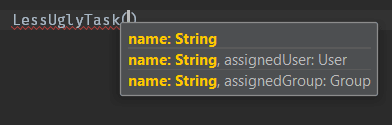
Finally two points that we should not neglect are readability and scalability. When using UglyTask if we want our code to be readable, in all cases, we have to pass the arguments by their names (thank you Kotlin 🙂 ):
This file contains hidden or bidirectional Unicode text that may be interpreted or compiled differently than what appears below. To review, open the file in an editor that reveals hidden Unicode characters.
Learn more about bidirectional Unicode characters
As far as scalability, consider how many changes we need to do to add a new assigned entity. One to the constructor, one to the init function to enforce our business logic and one in every function that we use the task’s state (see: printAssignment()) which adds even more null checks.
Second implementation: The less ugly way
Another way is by having multiple constructors, each for every valid assignment:
This file contains hidden or bidirectional Unicode text that may be interpreted or compiled differently than what appears below. To review, open the file in an editor that reveals hidden Unicode characters.
Learn more about bidirectional Unicode characters
This implementation also puts all the logic in the task but it removes those null checks and makes it easier for the developer to understand it:
With that said, all other drawbacks in readability and scalability remain the same:
This file contains hidden or bidirectional Unicode text that may be interpreted or compiled differently than what appears below. To review, open the file in an editor that reveals hidden Unicode characters.
Learn more about bidirectional Unicode characters
The best way to implement the business logic is by using Kotlin’s sealed classes. This way we can represent our business logic straight into our code and also keep our code clean, readable and scalable:
This file contains hidden or bidirectional Unicode text that may be interpreted or compiled differently than what appears below. To review, open the file in an editor that reveals hidden Unicode characters.
Learn more about bidirectional Unicode characters
Now, printAssignment() leverages all of Kotlin’s powers, including smart cast, making it easier to the eye:
This file contains hidden or bidirectional Unicode text that may be interpreted or compiled differently than what appears below. To review, open the file in an editor that reveals hidden Unicode characters.
Learn more about bidirectional Unicode characters
and the rest of the code does not need any extra help like named arguments:
This file contains hidden or bidirectional Unicode text that may be interpreted or compiled differently than what appears below. To review, open the file in an editor that reveals hidden Unicode characters.
Learn more about bidirectional Unicode characters


 le0nidas