Use AI _in_ a tool not _as_ a tool

Or to be more exact, use a coding agent in a tool. This is my new starting point every time I begin to think of a tool I want to implement.

Being part of the pipeline
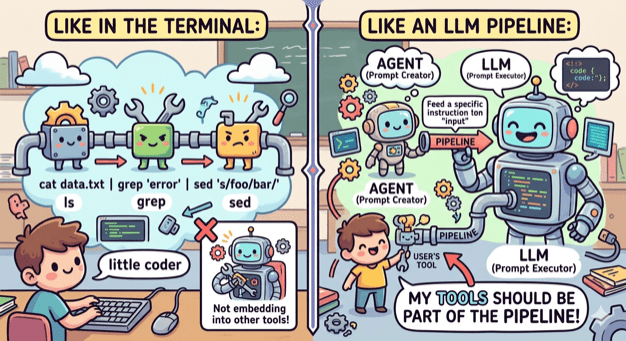
A couple of weeks ago I thought of creating an OpenCode agent that will check my uncommitted changes, construct a commit message and finally make the actual commit.

The first version was ok but I wanted to make a few changes. First I wanted the agent to follow certain guidelines, so I edited the agent file. Then I wanted to change the way it constructed the git command, so I edited the agent file. Finally I wanted to support the usage of GitButler, so I edited the agent file.

At that point I realized that I was violating the single responsibility principle big time. No matter the change I’ve kept editing the same component. And it hit me, fascinated by all the things I was able to do with a coding agent I failed to apply good engineering practices when it comes to the construction of tools.

Small coherent components that do one thing and do it well

When we write code we tend to break it into small modules, classes, functions that have one responsibility and provide a lean API. This way we can reuse components, combine them in different ways and replace them easily.

No need to do the opposite when it comes to tooling. The terminal has led the way by having small tools that do one thing (ls, grep, cat etc) and can be combined, by using pipes, into an entire workflow. My tools need to embrace that as well.

ai-commit.sh
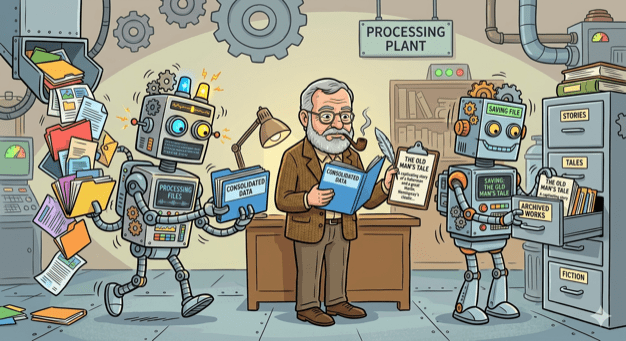
So I broke my agent’s workflow into distinct components:

  1. Create a single prompt from collecting all changes. This can be done by a bash script.
  2. Feed the prompt to an agent that is configured to create a title and a message. This can be done by OpenCode with a custom agent.
  3. Get the agent’s output and use it to make a commit using the appropriate tool. This can be done by a bash script.

I created the two scripts and also wrote one more that ties everything together: ai-commit.sh

In case you are wondering why Hemingway (or Hemi for the friends) is in the picture, it’s just the name I gave to what was left from the original agent: hemi.md

Pinky and Brain v2

Three months I wrote about Pinky and Brain, my agent/subagent duo that was helping me plan and execute a task while being in the loop. I was using it quite often but whenever I did I also saw the number of my available copilot requests decreasing fast! So I started avoiding it and preferred writing code manually like a caveman.

My setup was a testimony of using coding agent as a tool. It was doing everything. Apart from planning, that should be done by it, it was also looping through tasks, delegating work, making commits, asking for the user’s approval to continue looping. Many of these operations where new requests (x3 because of Opus).

So I sat down and broke that too:

  1. Planning is still being make by an agent (Brain). Only this time it is not tied to a model and it is very restricted. It can only save the created tasks to beads which will be loaded as a skill.
  2. Execution is still being done by an agent (Pinky). Only this time it is even more simpler. It is asked to just follow instructions nothing else.
  3. Everything else is part of a bash script that (a) uses bd to get the next task, (b) provides its description as a prompt to Pinky, (c) closes the task when Pinky returns, (d) uses ai-commit.sh to create a commit, (e) loop again.

I’ve been using it for a couple of weeks now and I’m sure I have a better consumption of requests.

Pinky and the Brain: my agent/subagent duo

OpenCode‘s agents configuration and Beads. A match made in heaven.

My flow until now

Working on a task starts with the Plan agent. I provide an initial prompt of what I want to achieve and the agent responds with a plan. If the plan needs adjustments I ask the agent to update it. When I’m satisfied with the final outcome I move to the execution of the plan. This will happen in one of two ways:

  1. If the context window is still small I simply change agents1 (move to Build) and ask it to proceed with the execution.
  2. If the context window is already big I ask the agent to save the plan in a markdown file, start a new session and ask the Build agent to read the file and execute the plan.

This flow works but there are a few drawbacks that bother me:

  • There is no human in the loop. I end up reviewing all changes at the end of the execution.
  • Even if I start a new session, depending on the size of the plan, the context window might get big causing the agent to misbehave. Especially in changes that must be repeated.
  • I usually use Opus for planning and Haiku for execution. There are times though that I forget to make the change ending up using Opus for everything. Opus is good but is also expensive!
  • You can’t easily pause the flow and continue from where you stopped.

My new flow

My new flow is based on one agent, one subagent and a database. In particular:

  1. Like before I start with an agent that will help me build a detailed plan that consists from a number of tasks.
  2. When I’m happy with the plan I ask the agent to use Beads and save each task under an epic.
  3. Then I ask the agent to start the execution loop.

Execution loop

  1. The agent uses Beads to figure out which task must be executed. It changes its status to in_progress and asks the subagent to execute it.
  2. The subagent reads the task, makes the necessary changes and informs the agent that it finished.
  3. The agent asks me to review the changes and approve them or not.
  4. If I approve the changes, the agent commits them, close the task and move to the next one.
  5. If I request changes, the agent asks the subagent to make them. At this point we move to step 2 again. We remain at this inner loop until I give my approval.

Pinky and the Brain2

If you didn’t make the connection yet, Brain is the name I gave to the agent (type primary) and Pinky is the subagent.

I did not created them on my own. I asked OpenCode to help me by describing the flow I wanted. OpenCode read its own docs, asked me a couple of clarifying questions and came up with these:
Brain: https://gist.github.com/le0nidas/aae1c9f1b35110a00b7157b6c2437444
Pinky: https://gist.github.com/le0nidas/b8a3a89131a639e39e42f7aaf794cf33

Benefits

  • I am finally in the loop. I review fewer changes at a time and sooner!
  • Using subagents for each task keeps both the agent’s and the subagent’s context window smaller and cleaner ending up in fewer, to none, misbehaviors.
  • Brain is tied with Opus and Pinky with Haiku. No need to remember to change anything!
  • The best of all, with Beads I can pause and resume whenever I want. The agent knows where to start from!

PS: if you are part of team and don’t want to pollute the codebase with various configurations, you can (a) init beads in stealth mode and (b) exclude .opencode folder from git

  1. according to the docs, all primary agents share the main conversation hence share the same context window ↩︎
  2. https://www.imdb.com/title/tt0112123/ ↩︎