There are times, especially in large code bases, that you might be working towards a solution and get stuck because of something that you did not foresee. That was my case this past week. In order to unblock the development of a new feature I decided to change the API of some classes. The changes would make the integration with the feature much easier and intuitive.
I moved some code, deleted some other, made a few additions and after 3 days I had the API I aimed for. Unfortunately this new API, even though it was great for the new feature, it did not play well with a certain flow. A flow that was not affected by the old API.
In other words by fixing one thing I broke another. So I did the only logical think to do.. I deleted the branch I working on!
Always weigh things
I have to admit that deleting a piece of code that you have worked for hours is not an easy decision. Especially when it looks and behaves as you have designed it. The urge to keep changing things in order to make all flows work is quite strong.
This is where you have to weigh things. Is it worth the effort? Do we have the time to invest? Will the final code be clean, scalable, readable?
In my case the decision to move forward and try to include the broken flow would mean tieing things together (bad code) and also adding a couple more days of work (more time). It wasn’t worth it.
Clean mind
A benefit of throwing a solution is that you can now see the other routes that where there from the start but you were too focused to notice them. Be it that you are no longer occupying your mind with the previous solution’s graph, be it that you have to figure something out, almost always you’ll find another way to tackle things.
In my case the new approach was way simpler and easier. The old API was left untouched and the entire integration was achieved from a different point that up until the deletion I hadn’t given it much attention.
Micro throwing
Throwing implementations is great for small things too like functions or new classes. Every time I develop one of them, if I start to feel that things are slowing down I don’t think of it much, I just reset --hard and start over (it always helps if you already have a couple of tests to back you up). Having one route crossed out and knowing, at least some part of the solution, I find the second, third etc implementation to be much faster.
For example, lets say we have a class that checks if a given task is valid. For reasons that do not interest us that same class makes a connection to another service and sends some data to it. That connection alone makes the class hard to test since we need to have and maintain a connection to that service during testing:
This file contains hidden or bidirectional Unicode text that may be interpreted or compiled differently than what appears below. To review, open the file in an editor that reveals hidden Unicode characters.
Learn more about bidirectional Unicode characters
In this example, isNotAssigned() makes the necessary checks but also sends the task to TaskAssigner so if we want to write some tests for TaskChecker we need to make sure that assigner is up and running.
Object seams
According to Mr Feathers there are three types of seams. The one that fits our case is called object seam and we are going to use it in order to bypass entirely making a connection and talking to the assigner.
Following the book’s example we end up with this:
This file contains hidden or bidirectional Unicode text that may be interpreted or compiled differently than what appears below. To review, open the file in an editor that reveals hidden Unicode characters.
Learn more about bidirectional Unicode characters
which does exactly what we want since it provides a way to write tests that do not involve the assigner. We just need to use TestingTaskChecker in our tests and we are good to go.
The downside with this approach is that we had to open our class which might not meet the project’s standards.
Function reference
Lets see what we can do without opening the class.
Just like before we need to extract the behavior that we want to override to its own method but this time we are also going to assign this method to a value and use the value in the calling site:
This file contains hidden or bidirectional Unicode text that may be interpreted or compiled differently than what appears below. To review, open the file in an editor that reveals hidden Unicode characters.
Learn more about bidirectional Unicode characters
isNotAssigned() will keep talking with the assigner only this time it does it through safeSendTaskToAssigner.
Default value
Having this function reference means that we can force isNotAssigned() to change its behavior by simply assigning a new value to safeSendTaskToAssigner! And this is what we are going to do:
This file contains hidden or bidirectional Unicode text that may be interpreted or compiled differently than what appears below. To review, open the file in an editor that reveals hidden Unicode characters.
Learn more about bidirectional Unicode characters
By default the seam is null which leads in having safeSendTaskToAssigner referencing the original behavior allowing the entire project to keep working as before without any additional changes to other files.
If now we pass a non null value then it gets assigned to safeSendTaskToAssigner and ends up being called instead of sendTaskToAssigner. This way we remove the communication from our flow allowing us to finally write some tests.
Testing
All we need to do is to write our tests by simply creating a checker with a do nothing seam:
This file contains hidden or bidirectional Unicode text that may be interpreted or compiled differently than what appears below. To review, open the file in an editor that reveals hidden Unicode characters.
Learn more about bidirectional Unicode characters
Or to be exact, multiple RecyclerViews with horizontal orientation inside a RecyclerView where its orientation is vertical.
Easy to implement and works out of box quite well as long as the user swipes gently or flings in an almost straight motion. Unfortunately this is not always the case. Especially when holding the phone with one hand the user tends to swipe with her thumb and in a great velocity ending up in a fling motion that has an arch shape:
user’s motion
This has the result of either moving on the vertical axis or not moving at all in both axes:
All movements in this video are with my right thumb while holding a 6” phone in my right hand. You might have noticed that the user’s experience gets even worse when trying to scroll a list that is positioned either in the bottom or the bottom half of the screen.
The touch flow
But why is that happening? To understand it we must first understand the flow that a single touch event follows starting by defining two things:
Every motion our finger does, either touching the screen, lifting it from it or dragging it along is being translated to a MotionEvent that gets emitted from the framework to our app. More specifically to our active activity.
A gesture is the sequence of motion events that start from touching our finger down, the MotionEvent‘s action is ACTION_DOWN, until we lift it up, the MotionEvent‘s action is ACTION_UP. All intermediate events have the ACTION_MOVE action.
Regular flow
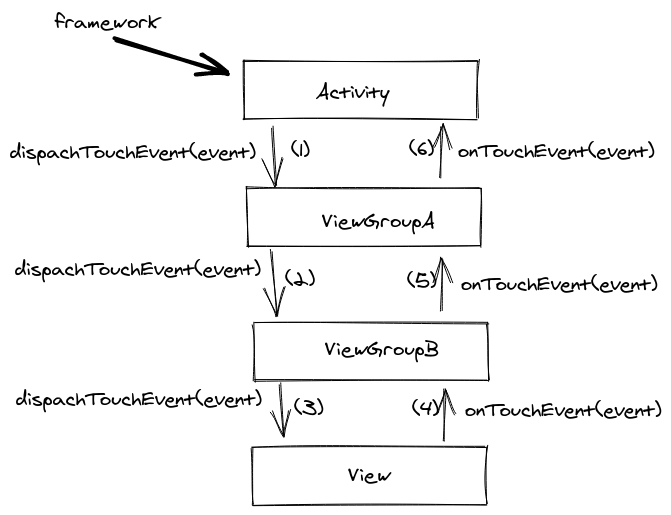
So, when the framework registers a motion event it sends it to our activity which then calls the dispatchTouchEvent method in its root view. The root view dispatches the event to its child view that was in the touch area, the child view to its child and so on so forth until the event reaches the last view in the hierarchy:
touch flow
The view then has to decide if it will consume the gesture by returning true in its onTouchEvent. If it returns false the flow will continue by asking the view’s parent and so on so forth until the event reaches the activity again.
Note that we say consume the gesture and continue here. That is because if the view returns true in the ACTION_DOWN event then all subsequent events, until the gesture’s end (ACTION_UP) will never reach the view’s parents on their way up. They will stop at the view.
Interception
You may ask yourself, what happens if the view’s parent is a scrollable view and the view decides to consume the gesture? Wouldn’t that mean that the parent will never get informed about the user’s movements thus will never scroll?
Correct! That is why the framework allows every view group to intercept an event before it reaches a view. There, the group can decide if it will just keep monitoring the events or stop them from ever reaching its children. This way view groups like ScrollView or RecyclerView can monitor the user’s gestures and if one of them gets translated to a scroll movement, they stop the events from getting to their children and handle them themselves (start scrolling).
The problem
This last part is the root of our bad UX. When the user flings her finger as shown above, the parent RecyclerView, which is always monitoring the emitted events, thinks that it was asked to scroll vertically and immediately prevents all other events from ever reaching the horizontal RecyclerViews while also start to scroll its content.
The solution
Fortunately the framework provides the solution (actually part of it) too.
A child view can ask its parent to stop intercepting and leave all events reach to it. This is done by calling, on its parent, the requestDisallowInterceptTouchEven(true) method. The request will cascade to all the parents in the hierarchy and as a result all events will reach the view.
That’s what we need to do here. All horizontal RecyclerViews need to ask their parents (this will affect the vertical RecyclerView too) to stop intercepting. The question is where to put this request.
Turns out that a OnItemTouchListener is the best place to make the request:
Add an RecyclerView.OnItemTouchListener to intercept touch events before they are dispatched to child views or this view’s standard scrolling behavior.
This way we can act upon an event before reaching the recycler’s content:
This file contains hidden or bidirectional Unicode text that may be interpreted or compiled differently than what appears below. To review, open the file in an editor that reveals hidden Unicode characters.
Learn more about bidirectional Unicode characters
With that we make sure that the moment the user starts a gesture nothing will stop it from reaching a horizontal recycler no matter how quick or slow the gesture is, or what shape it has.
Now you might wonder what happens when the user wants to actually scroll up or down! Well this is when we need to permit the parents to intercept again:
This file contains hidden or bidirectional Unicode text that may be interpreted or compiled differently than what appears below. To review, open the file in an editor that reveals hidden Unicode characters.
Learn more about bidirectional Unicode characters
On ACTION_DOWN except from making the request we also keep the x and y coordinates that the touch occurred. Then while the user drags her finger we try to figure out if the user drags it horizontally or vertically. If it is vertically then it does not concern us (being a horizontal recycler) so we allow our parents (this means the vertical recycler too) to start intercepting again. Now the vertical recycler acts upon the events and takes over the gesture:
after
PS: onTouchEvent is part of View and can only be overridden from custom views. That is why the framework provides a OnTouchListener so that we can consume a gesture in any of the framework’s views since the framework checks if there is a listener first and only if there is none or if it didn’t handle the event it calls onTouchEvent.
…or you’ll end up testing how your code does something and not what it does.
Think of it like a box
No matter what we consider to be a unit, be it a function, a class or an entire module, we should aim in testing it as we intend to consume it in the rest of our code.
This helps us in viewing the unit as a black box that accepts an input and provides an output. We don’t care what’s inside the box. We don’t care how the box handles our input. We only care about the outcome. This is what we need to assert.
Why do we write tests?
We write tests to make sure our code behaves as we intended it to. We write tests to document this behavior. We write tests to have a safety net whenever we wish to change the code but not its behavior.
The key here is behavior. Testing has nothing to do with implementation.
If we expose internal parts of our box we check how the box works and we couple it with our tests meaning that each time we make a change inside the box we have to change our tests too.
By definition this results in losing the ability to refactor.
Test it as it is meant to be used
When consuming a unit of code in production we respect its API and use it as is.
If we start testing individual parts of our box we might be certain that these parts work properly but we don’t know if their integration works too since we have asserted results that where the outcome of a flow that will never occur in our program. In other words we will never consume the API this way.
If testing the box as it’s meant to be used seems difficult then there is something wrong with the box’s API and by exposing code is like hiding all the dirt under the carpet. Eventually we will have to deal with it.
Whenever we need to write asynchronous code we tend to use callbacks which allow us to trigger an action and, instead of waiting for it to finish, get notified through the callback for the action’s completion. Coroutines change that and help us write asynchronous code but in a sequential way.
This means that instead of writing code like this:
This file contains hidden or bidirectional Unicode text that may be interpreted or compiled differently than what appears below. To review, open the file in an editor that reveals hidden Unicode characters.
Learn more about bidirectional Unicode characters
This file contains hidden or bidirectional Unicode text that may be interpreted or compiled differently than what appears below. To review, open the file in an editor that reveals hidden Unicode characters.
Learn more about bidirectional Unicode characters
But what do we do when there is no easy way to remove callbacks from existing code or when we use a third party library that is not coroutines ready? This is where suspendCoroutine comes to save the day.
suspendCoroutine
suspendCoroutine is a function that does exactly what is says. It suspends the coroutine that it was called from and provides a way to resume it.
Lets have an example. The code here:
This file contains hidden or bidirectional Unicode text that may be interpreted or compiled differently than what appears below. To review, open the file in an editor that reveals hidden Unicode characters.
Learn more about bidirectional Unicode characters
This file contains hidden or bidirectional Unicode text that may be interpreted or compiled differently than what appears below. To review, open the file in an editor that reveals hidden Unicode characters.
Learn more about bidirectional Unicode characters
it will print 1 2 3 and then it will just wait. We suspended the coroutine but we did not resume it. To do so we will use the continuation instance that suspendCoroutine provides:
This file contains hidden or bidirectional Unicode text that may be interpreted or compiled differently than what appears below. To review, open the file in an editor that reveals hidden Unicode characters.
Learn more about bidirectional Unicode characters
now it prints 1 2 3 … 4 Done!. The coroutine printed the first three numbers, got suspended, while being suspended another block of code got executed and printed the dots and then resumed the coroutine allowing it to print the final number and done.
Continuation adapter
Back to our first example. Lets say that downloadTasks cannot be changed. We still need to call it and provide a callback for its results.
What we need to do is to suspend the coroutine, call downloadTasks to.. well.. download the tasks and provide a callback that upon completion it will resume the coroutine with the tasks at hand.
To achieve that we first need to create an adapter that will connect the callback with a continuation:
This file contains hidden or bidirectional Unicode text that may be interpreted or compiled differently than what appears below. To review, open the file in an editor that reveals hidden Unicode characters.
Learn more about bidirectional Unicode characters
This file contains hidden or bidirectional Unicode text that may be interpreted or compiled differently than what appears below. To review, open the file in an editor that reveals hidden Unicode characters.
Learn more about bidirectional Unicode characters
That’s it. The adapter resumes the coroutine by providing the tasks that are then returned to the suspension point.
One more thing
Along side suspendCoroutine there is also suspendCancellableCoroutine which provides a cancellable continuation. That means that in addition of resuming we can also execute code upon cancellation:
This file contains hidden or bidirectional Unicode text that may be interpreted or compiled differently than what appears below. To review, open the file in an editor that reveals hidden Unicode characters.
Learn more about bidirectional Unicode characters
There are myriads of blog posts that showcase how to debounce the user’s input by using either rxjava or coroutines. The question is how to implement such a functionality when the project does not have these dependencies?
Debounce
First of all, what is debounce? In essence debounce is a pattern that helps in preventing the repeated execution of a block of code. It does that by adding a delay between two consecutive calls to the block and by cancelling the first call when the second is requested. For example:
When the user types in her keyboard, every key stroke results in calling a block of code that renders what she typed:
without debounce
By having debounce when the user types, each call gets delayed and cancelled if a new one gets requested resulting in rendering the entire text when the user is finished typing:
with debounce
Before starting
We are going to add the debounce functionality to the example above. The initial code is very simple:
This file contains hidden or bidirectional Unicode text that may be interpreted or compiled differently than what appears below. To review, open the file in an editor that reveals hidden Unicode characters.
Learn more about bidirectional Unicode characters
where userInput is the EditText that the user writes in and userResult is the TextView that the user’s input gets rendered.
Adding the debounce functionality
There are two ways to do this. The first uses java’s Timer and TimerTask and the second android’s Handler. Both of them help in implementing the same algorithm:
on every key stroke we first cancel any previous call request
then we setup some kind of timer for our delay and the code that needs to be called
and finally, when the time passes, we make the call
Timer and TimerTask
We can use Timer to schedule the execution of a block of code after a given delay. The provided block must be a TimerTask which will be added to a queue and when the time comes it will be executed in a background thread. This last part is very important since we cannot set anything UI related there. That’s why we use the Timer just for the delay part and then we use the view’s Handler to execute the actual code to the main thread:
This file contains hidden or bidirectional Unicode text that may be interpreted or compiled differently than what appears below. To review, open the file in an editor that reveals hidden Unicode characters.
Learn more about bidirectional Unicode characters
Recommended when there is a need to do some intensive work before returning back to the main thread but besides that it could be an overkill. That’s why it might be better to use the view’s Handler for both the delay and the execution.
Handler
The Handler class packs the same functionality as the Timer. We can use it to add a block of code (being added as a callback in a Message instance) in a queue (the handler’s MessageQueue) and when the time comes the message gets removed from the queue and its callback gets executed in the thread that the handler was created in. In our case, since we are using the view’s handler we can be sure that the execution will take place in the main thread.
The Handler class provides methods for both adding and removing from the queue. So what we end up with is something like this:
This file contains hidden or bidirectional Unicode text that may be interpreted or compiled differently than what appears below. To review, open the file in an editor that reveals hidden Unicode characters.
Learn more about bidirectional Unicode characters
One note about the counter variable. For removing a particular message we need to identify it and to do that we can use what is called a token. When posting for delay, we also provide an id in the form of a counter so that we can request its deletion later on.
Debounce extension
Since we are in Kotlin land and to avoid having the above code duplicated with various global counters for identification we can create an extension function that will pack everything together and help us in having a reusable component and more readable code:
This file contains hidden or bidirectional Unicode text that may be interpreted or compiled differently than what appears below. To review, open the file in an editor that reveals hidden Unicode characters.
Learn more about bidirectional Unicode characters
This file contains hidden or bidirectional Unicode text that may be interpreted or compiled differently than what appears below. To review, open the file in an editor that reveals hidden Unicode characters.
Learn more about bidirectional Unicode characters
Ever since Kotlin introduced coroutines there has been a plethora of posts that showcased their usage in networking or multi threading scenarios. Inevitably many developers when asked what a coroutine is their first answer was “a lightweight thread” or “a way to write clean asynchronous code”. Unfortunately this is not the definition of a coroutine but rather a couple of things that a coroutine can help us with.
Routine (aka Subroutine)
So what is a coroutine? To answer that we must first understand what a routine is.
A routine is nothing more than the common function that we all use every day. Its main characteristic is that its execution must come to a completion before returning to the caller. It does not hold any state and calling it multiple times is like calling it for the first time.
An example:
This file contains hidden or bidirectional Unicode text that may be interpreted or compiled differently than what appears below. To review, open the file in an editor that reveals hidden Unicode characters.
Learn more about bidirectional Unicode characters
On the other hand a coroutine (a concept that is way older than Kotlin) is a function that can hold its current state allowing us to pause and resume its execution at certain suspension points. This can be of great help when we need to write concurrent code, meaning, when we need to run two tasks at the same time by executing small parts of those tasks one at a time.
For example, if we have task A broken in two parts (A1, A2) and task B broken in two parts as well (B1, B2), we can write code that executes first A1, then B1, then A2 and finally B2.
Building a coroutine
Our goal is to convert the above routine into a coroutine and to do so we need to have a blueprint:
This file contains hidden or bidirectional Unicode text that may be interpreted or compiled differently than what appears below. To review, open the file in an editor that reveals hidden Unicode characters.
Learn more about bidirectional Unicode characters
So, step #1 is to separate the states into blocks of code and to do that we are going to use the when statement:
This file contains hidden or bidirectional Unicode text that may be interpreted or compiled differently than what appears below. To review, open the file in an editor that reveals hidden Unicode characters.
Learn more about bidirectional Unicode characters
the problem here is that the code does not compile since the states do not communicate and are missing important information.
To fix it we are moving to step #2 where the state parameter will be used as a vessel to pass data from one state to the other:
This file contains hidden or bidirectional Unicode text that may be interpreted or compiled differently than what appears below. To review, open the file in an editor that reveals hidden Unicode characters.
Learn more about bidirectional Unicode characters
the code now has distinct states that share data but it cannot resume correctly since there is no way to move from one state to the other.
Step #3 addresses that by updating the state’s label allowing the function to resume from where it was paused:
This file contains hidden or bidirectional Unicode text that may be interpreted or compiled differently than what appears below. To review, open the file in an editor that reveals hidden Unicode characters.
Learn more about bidirectional Unicode characters
and that’s it. saveUserTasks is now a coroutine where every call executes a small part of the function allowing us to pause and resume the task:
This file contains hidden or bidirectional Unicode text that may be interpreted or compiled differently than what appears below. To review, open the file in an editor that reveals hidden Unicode characters.
Learn more about bidirectional Unicode characters
We did manage to convert a routine to a coroutine but the example did not show the power of using coroutines which is concurrency. Lets change that.
To make things a little bit easier we are going to package a few common functionalities together
This file contains hidden or bidirectional Unicode text that may be interpreted or compiled differently than what appears below. To review, open the file in an editor that reveals hidden Unicode characters.
Learn more about bidirectional Unicode characters
This file contains hidden or bidirectional Unicode text that may be interpreted or compiled differently than what appears below. To review, open the file in an editor that reveals hidden Unicode characters.
Learn more about bidirectional Unicode characters
This file contains hidden or bidirectional Unicode text that may be interpreted or compiled differently than what appears below. To review, open the file in an editor that reveals hidden Unicode characters.
Learn more about bidirectional Unicode characters
As you can see the two functions are being executed concurrently. First we load the user, then we download the settings, then we load the user’s task and so on and so forth!
Further reading
My goal with this post was to give you a better understanding on what a coroutine is and I did it by using the concept of a finite state machine. The same concept that Kotlin’s implementation of coroutines uses.
For digging in the actual implementation of coroutines I suggest you take a look at a couple of great posts that helped me a lot in grasping the concept:
This is one of my favorite principles because it is easy to spot when violated and because it helps in having proper API surfaces when applied.
Tell, don’t ask
In essence this principle proposes that instead of asking from an instance for its values in order to decide how the same instance will execute something, just tell the instance to execute it. It knows its own state, it can make its own decisions!
Asking
By asking we actually refer to accessing many of a class’s properties. For example:
This file contains hidden or bidirectional Unicode text that may be interpreted or compiled differently than what appears below. To review, open the file in an editor that reveals hidden Unicode characters.
Learn more about bidirectional Unicode characters
in the code above we ask the task to provide the values of three of its properties in order to decide if we are going to close it or not. In the process we (a) might had to expose those properties just for this code (creation date and subscribers could be private) and (b) inevitably leaked business logic that involves a task (when a task is eligible for closing).
Telling
Lets change the code in order to tell the task to close itself if possible:
This file contains hidden or bidirectional Unicode text that may be interpreted or compiled differently than what appears below. To review, open the file in an editor that reveals hidden Unicode characters.
Learn more about bidirectional Unicode characters
I am under the impression that every time I come across a SOLID post, LSP and ISP are not given the same amount of attention as the other three. I guess its because they are the easiest to grasp but make no mistake, they are also the easiest to violate!
Liskov Substitution Principle (LSP)
In essence, LSP proposes that we create sub-classes that can be used wherever their parents are being used without breaking or changing the client’s behavior.
This means that in the code snippet below:
This file contains hidden or bidirectional Unicode text that may be interpreted or compiled differently than what appears below. To review, open the file in an editor that reveals hidden Unicode characters.
Learn more about bidirectional Unicode characters
we should be able to pass instances from all sub-classes of SoftwareEngineer without worrying that calculateSeniority will break or change the behavior of printSeniority.
Ways that we tend to violate LSP
By throwing an exception
This file contains hidden or bidirectional Unicode text that may be interpreted or compiled differently than what appears below. To review, open the file in an editor that reveals hidden Unicode characters.
Learn more about bidirectional Unicode characters
This is the obvious one. If, for example, the subclass adds a check that will eventually throw an exception then the client will break.
By returning undocumented results
This file contains hidden or bidirectional Unicode text that may be interpreted or compiled differently than what appears below. To review, open the file in an editor that reveals hidden Unicode characters.
Learn more about bidirectional Unicode characters
In other words, the subclass returns something that the its parent never will. This forces the client to know about the subclass which makes the code less scalable.
By having side effects
This file contains hidden or bidirectional Unicode text that may be interpreted or compiled differently than what appears below. To review, open the file in an editor that reveals hidden Unicode characters.
Learn more about bidirectional Unicode characters
This is the subtle one since it does not change the client’s code but it does change the expected behavior. printSeniority is expected to make a calculation and then print the result but know it also makes a network call!
Interface Segregation Principle (ISP)
In essence, ISP proposes that interfaces should not play the role of “methods bucket” because eventually there will be a client that will not need to implement all of them.
This means that interfaces like this:
This file contains hidden or bidirectional Unicode text that may be interpreted or compiled differently than what appears below. To review, open the file in an editor that reveals hidden Unicode characters.
Learn more about bidirectional Unicode characters
should break in more meaningful parts and allow every client to implement only the part that it needs:
This file contains hidden or bidirectional Unicode text that may be interpreted or compiled differently than what appears below. To review, open the file in an editor that reveals hidden Unicode characters.
Learn more about bidirectional Unicode characters
Its worth mentioning that this way, in addition from avoiding ISP violation we also:
Keep our code from violating the SRP. In the first implementation, our cache depends in two things so it has more that one reasons to change (ex: a new parameter in the post method would force us to change our cache too)
Keep our code from violating the LSP. By having one interface, the first implementation of our cache couldn’t be used in code that expects repositories since its API methods would break the client.
Keep our code clean and scalable (the cache does not have to know about talking to the API)
Ways that we tend to violate ISP
Although there is not much to say here, since the only way to do it is by creating those buckets we mentioned above, beware of the creation since it comes in two flavors. The first is by having all methods in one file. Easy to catch it in a PR review. The second though is by having an hierarchy in our interfaces.
This file contains hidden or bidirectional Unicode text that may be interpreted or compiled differently than what appears below. To review, open the file in an editor that reveals hidden Unicode characters.
Learn more about bidirectional Unicode characters
Primitive obsession is a known code smell that describes the usage of primitives for representing domain values. For example:
This file contains hidden or bidirectional Unicode text that may be interpreted or compiled differently than what appears below. To review, open the file in an editor that reveals hidden Unicode characters.
Learn more about bidirectional Unicode characters
In this class both the user’s name and age are being represented by a string and an int respectively.
How else could we represent a name and an age? Well, the primitives are the correct ones but not for direct usage. We can build value objects upon them and encapsulate both the meaning of the value and the business logic:
This file contains hidden or bidirectional Unicode text that may be interpreted or compiled differently than what appears below. To review, open the file in an editor that reveals hidden Unicode characters.
Learn more about bidirectional Unicode characters
So what? You just wrapped a primitive and moved the check. True but now we have:
1. A reusable object
When the time comes and we need to have a new named entity we just use the class above and we can be sure that the business logic will follow along and be concise in the entire project.
2. Always valid instances
Whenever we see an instance of name or age we are certain that the instance holds a valid value. This means that an entity that consists from those value objects can only create valid instances and this means that the code that uses those entities (and value objects) does not need to have unnecessary checks. Cleaner code.
3. Code that scales more easily
Lets say that our business logic changes and we need to support users with invalid names too but without the need to deal with the name itself. Having a value object can help implement the change easily. We just change the Name class. All other code remains the same:
This file contains hidden or bidirectional Unicode text that may be interpreted or compiled differently than what appears below. To review, open the file in an editor that reveals hidden Unicode characters.
Learn more about bidirectional Unicode characters
Lets say that our entities have the notion of an id and that after a few years the underline value needs to change from an integer to a long. By having a value object to represent the Id all changes will take place in the outer layers of our architecture where we load/fetch ids from databases/network and create the id instances. The rest of project will remain untouched, especially the domain layer that holds our business logic. If we had chosen the path of having an integer property in every entity then all of our entities, and the code that uses them, would need to change too.
5. Code that is more readable and reveals its usage
I’ve written a couple of posts in the past that showcase both the readability aspect and the revelation one.
6. A blueprint of our domain
When we open our project and see files like Invoice, Price, Quantity, Amount, Currency we get an immediate feel of what this project/package deals with and what are its building blocks. We consume information that we would otherwise need to dig inside each file to find out.
7. A context
The final and most important part of having value objects is that now we can complete our entities and build a context for our domain. A common language that we can use to communicate with other engineers and stake holders in general. Primitives are essential and they are the building blocks of a language but not of our business. The rest of company does not build its workflows upon integers and strings. It uses the businesses’ building blocks like age, name etc. It is vital that we do the same too in order to keep our code base in sync with the business.




 le0nidas